
6.8. Legal
Account menu 🠆 Settings 🠆 Legal
Displayed are the current terms and conditions and privacy statement for the site. If you are a member of an institution, you also see the institution privacy statement and terms and conditions if your institution set them up.
If ‘Strict privacy’ is turned on for the site that you use, you must decide whether you consent to the statements or not.
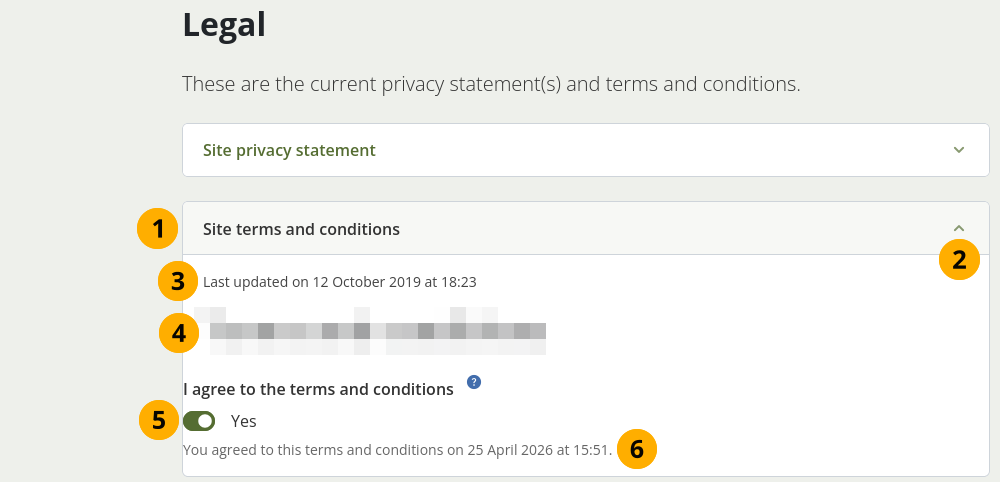
Legal statements for you to consent to
Title of the legal statement.
Note
There can be up to four statements that you may need to consent to. This depends on the setup of the site that you use. There are the site and institution statements.
Select the Collapsable icon keyboard_arrow_up to close this section. This is helpful if the texts are very long. You can then see your decision faster.
The date the statement was last updated.
The text of the statement.
Your previous decision of agreement. If you do not consent to the text any more, e.g. because it was updated with unfavourable terms, flip the switch to ‘No’.
The date and time when you consented to each statement is displayed.
Select the Save changes button to accept your decisions.
If you do not consent to one of more of the statements, you are presented with the following screen.
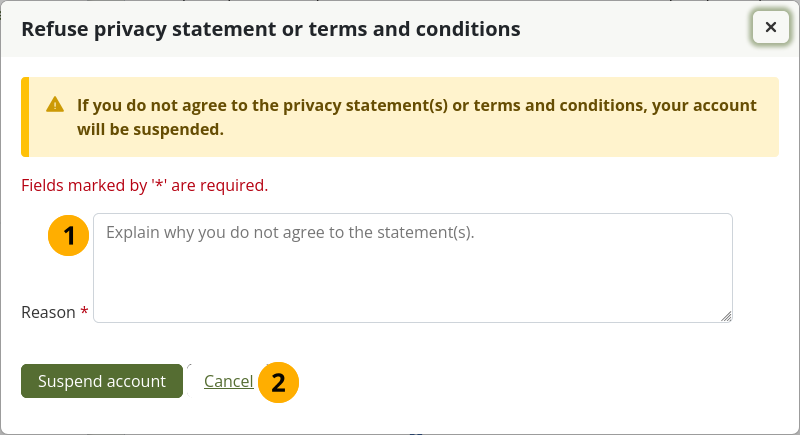
Provide a reason for refusing consent
Enter a reason for refusing to agree to one or more of the legal statements.
Select the Suspend account button to send your refusal message to your institution administrator. If you made a mistake and do want to consent to all statements, you can select Cancel and go back to the previous page.
If you decide to send your reason for refusal, your account will be suspended, and your institution administrator (or the site administrator if you are not a member of an institution) will receive a notification about the refusal. They can then get in touch with you to discuss your decision.